All features

Worker QR code

QR code on the hard hat: check a subcontractor's worker with a phone

Every worker assigned to a site has their own QR code. A sticker on the hard hat or ID badge leads to a check page: scanning it with a phone shows the name, firm, site and check result from the current state in Atestero.

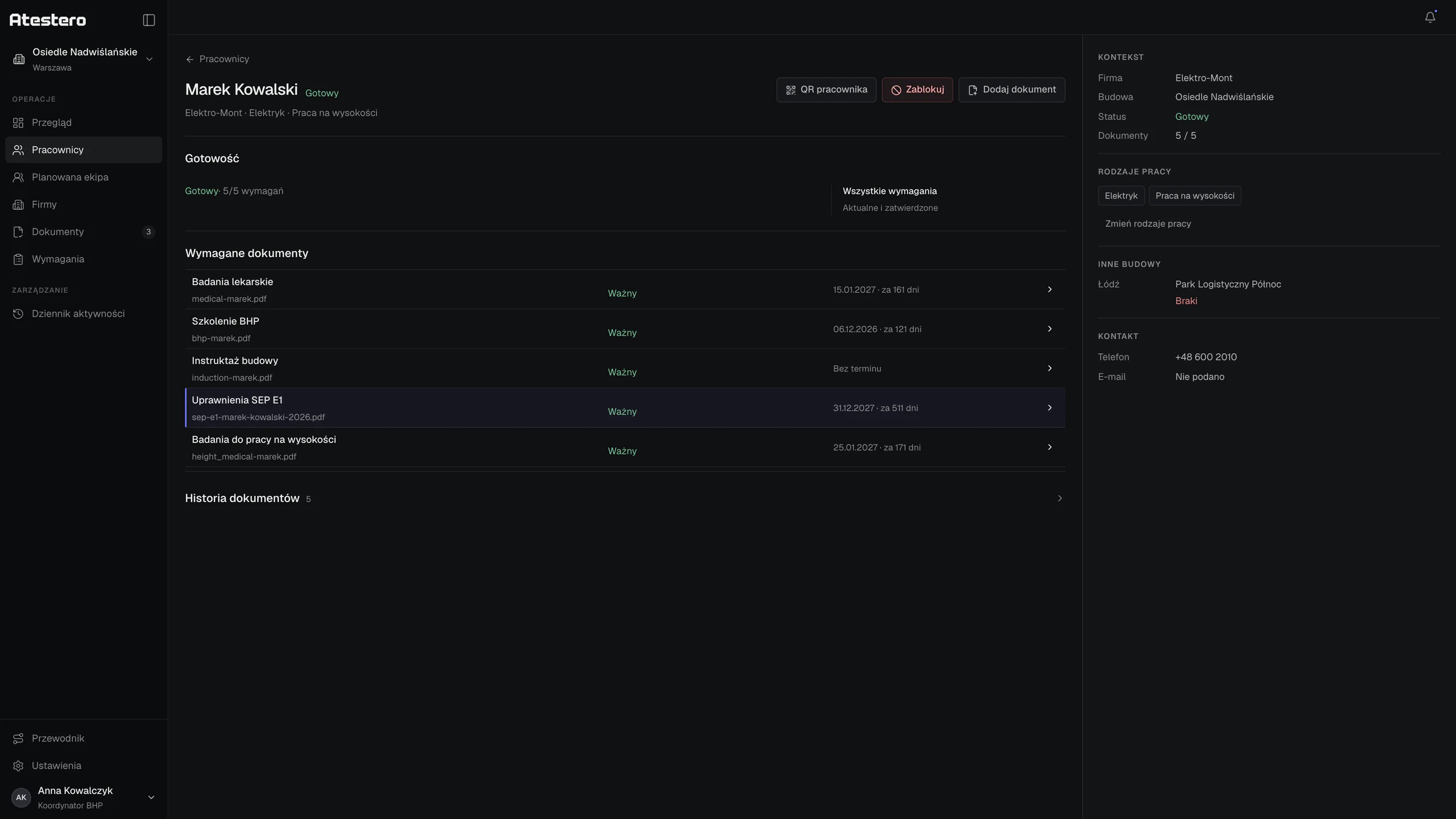
Demo worker profile in Atestero, opened after login by scanning the QR code
At the gate

A scan shows the current state, not what was printed

The code holds only the address of a check page with a random identifier, no personal data. Every scan reads the live state, so when a document expires after the sticker was printed, the result changes without replacing the label.

Name, firm and siteCheck result by the site's rulesTime of the scanNo documents or medical data
After login

An authorised person goes from the scan to the profile

A person in the organisation whose role allows it goes from the scan straight to the worker's profile, with documents and missing items, after logging in. Someone without an account sees only the check result. You scan with the phone camera in the app or type the code in by hand.

Scanner in the appManual code entryProfile and documents after loginAccess depends on role
Printing

50×30 mm labels from a thermal printer or an A4 sheet

Codes are printed one by one or for a whole crew at once: on 50×30 mm labels from a NIIMBOT thermal printer or on an A4 sheet from an office printer. The label carries the QR code, name, firm and site.

NIIMBOT B1 printerA4 sheet in 2 to 4 columnsPrint for a whole crewOptional cut lines

Key capabilities

Every worker assigned to a site has their own QR code. A sticker on the hard hat or ID badge leads to a check page: scanning it with a phone shows the name, firm, site and check result from the current state in Atestero.

01Code for each worker on site
02Scan with a phone camera
03Result from the current state
0450×30 mm labels

Guides related to this feature (in Polish)

Practical answers about the same stage of the process.

Porównanie narzędzi

Programy do BHP i kontroli dokumentów pracowników: porównanie 2026 dla firm budowlanych

Questions: worker qr code

Answers on how this part of the process works in Atestero.

01Does the QR code on the hard hat contain the worker's personal data?

No. The code holds the address of a check page with a random identifier. The name, firm, site and check result appear only after scanning, read from the current state in Atestero.

02What does someone who scans the code without logging in see?

The name, firm, site, check result and time of the scan. Documents, dates and medical data are not shown. The worker's profile opens only after logging in, for a person whose role allows it.

03Do I have to print a new sticker when a document expires?

No. Every scan reads the live state, so a change to a document or its date changes the result without replacing the label.

04Does the QR code replace gates and access control?

No. Atestero does not control gates or turnstiles. The code lets you check a worker with a phone at the entrance or on the site, and the person carrying out the check makes the decision.

Atestero · subcontractor worker readiness

See the whole process on demo data.