All features

Subcontractor portal

The subcontractor sees exactly what to complete

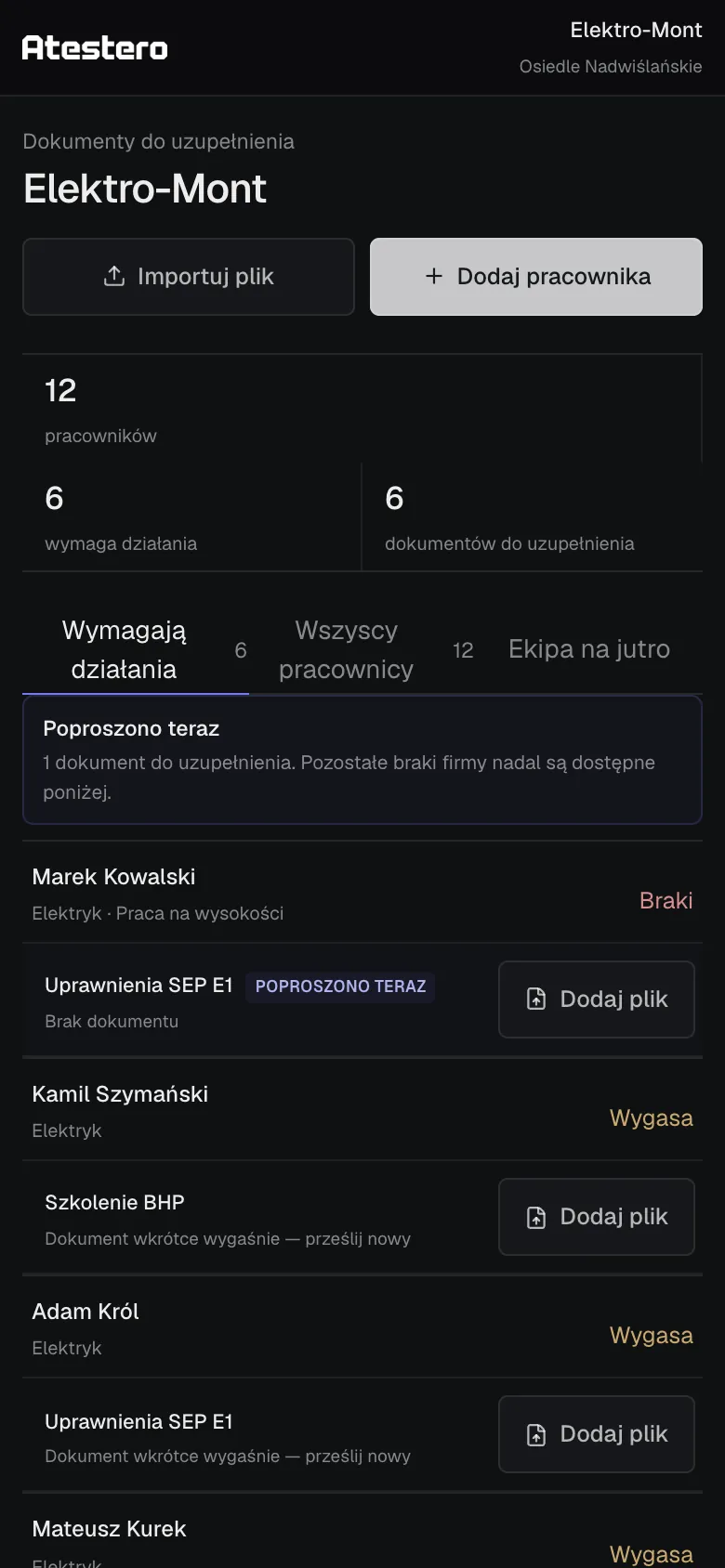
The mobile portal leads the firm to the right worker and document. It does not need access to the site manager's panel or the whole database.

Demo mobile subcontractor portal with missing documents
Simple access

The firm does not have to learn the whole system

The portal shows the firm's workers and the items to complete. Every request has a clearly stated purpose.

Scope limited to their own firmA clear list of missing itemsAction tied to a specific personBuilt for the phone
Upload

The file goes straight to the review queue

After a document is added, the site manager or H&S does not have to look for it in e-mail. The document keeps the context of the worker and requirement.

Add a PDF, JPG or PNGDeclared dates“To review” statusCan be sent back for correction

Key capabilities

The mobile portal leads the firm to the right worker and document. It does not need access to the site manager's panel or the whole database.

01Mobile view
02Their own workers
03A specific gap
04No management panel

Questions: subcontractor portal

Answers on how this part of the process works in Atestero.

01Does the portal need a full user account?

It does not have to. It can work through limited, expiring and revocable access tied to a specific firm and site.

02Does a firm see other subcontractors' data?

No. The scope of the portal should be limited on the server side to one firm and its workers.

03What happens after a file is uploaded?

The document keeps the context of the worker and requirement, and then goes to the reviewer's queue.

04Can access to the portal be switched off?

Yes. The link should have an expiry date, usage limits and a way to revoke it manually.

Atestero · subcontractor worker readiness

See the whole process on demo data.