All features

Expiry dates

Medical certificates, H&S training and licence dates for site workers in one view

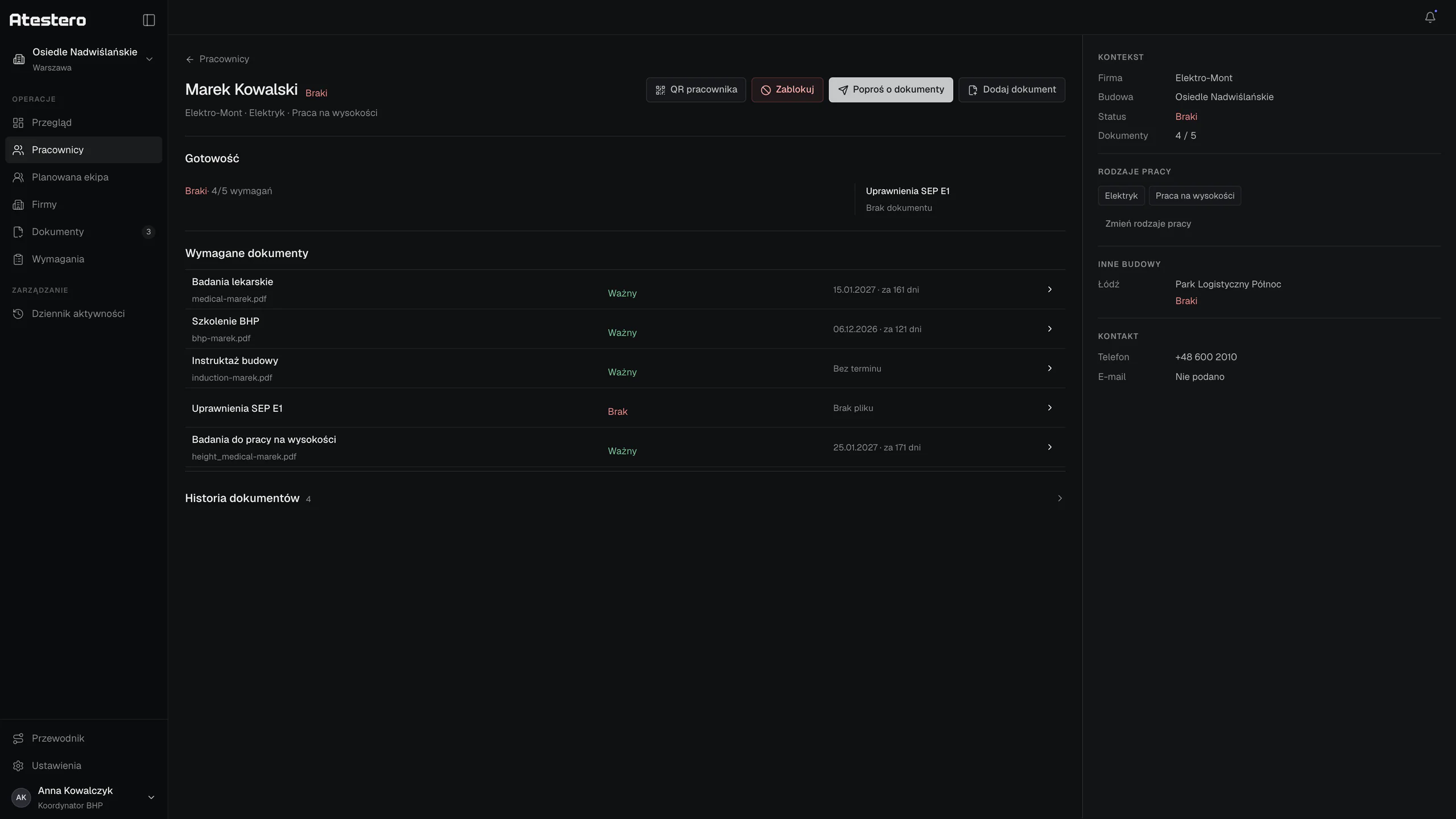
Every required document of a worker has an expiry date and a status: valid, expiring, expired or waiting for review. The date shows next to the worker, the firm and the planned crew, and a request for a new document goes to the subcontractor through the portal. Atestero does not send automatic e-mail reminders.

Demo worker profile in Atestero with required documents, their status and the days left until expiry
Date

An expiry date on each document and worker

Each required document shows its expiry date and the days left. When the date enters the warning threshold set for the organisation (30 days by default), the document gets the status “Expiring”. After the expiry date the status is “Expired” and the worker is no longer ready for that requirement.

Medical certificatesH&S trainingUDT and SEP licencesDocuments without a date
Action

A request to the right firm and a human decision

From a worker's profile or the list of missing items you send a request for a document, and the subcontractor adds a new file in the portal under the same worker. The new version waits for review, and only approval changes the state of the document. Atestero does not send automatic e-mail reminders about approaching dates.

Request for a documentSubcontractor portalReview of the new versionHistory of earlier versions
Start

A register from Excel and a free date calculator

The validity period depends on the document: the doctor writes the date of the next examination in the certificate, periodic training repeats on a date set by regulation and counted from the previous training, and UDT certificates and SEP licences carry a date on the document. You can import a spreadsheet of dates or check a single date in the free document validity calculator.

Import from XLSX or CSVDocument validity calculatorTemplate register of training and medical datesPriority by planned crew

Key capabilities

Every required document of a worker has an expiry date and a status: valid, expiring, expired or waiting for review. The date shows next to the worker, the firm and the planned crew, and a request for a new document goes to the subcontractor through the portal. Atestero does not send automatic e-mail reminders.

01Expiry date on each document
02“Expiring” status with a threshold
03Request to the firm via the portal
04A new file waits for a decision

Questions: expiry dates

Answers on how this part of the process works in Atestero.

01Does Atestero send e-mail reminders about expiring medical certificates?

No. An expiring document gets the status “Expiring” in the panel, with a warning threshold set for the organisation (30 days by default), and a request for a new document goes to the firm through the subcontractor portal.

02Where does Atestero get a document's expiry date from?

The person uploading the file enters the date, and in bulk scan upload the system can suggest it from the PDF text. The reviewer checks the date before approving. The periods from regulations are collected in a table of document validity for construction workers (in Polish).

03What happens when a subcontractor uploads a new document before the date runs out?

The new version waits for review. Until a decision is made, the previous approved document with its date applies, and after approval the state changes based on the new date.

04Can I calculate a date without creating an account?

Yes. The free document validity calculator (in Polish) works out the date for H&S training, medical examinations and licences without logging in.

Atestero · subcontractor worker readiness

See the whole process on demo data.