Open the link from the general contractor
The link may ask for a one-time code sent by e-mail. After entering you see only your firm's workers and the items that need action.
For subcontractors
Every request names the person, the document and the reason, so there is no hunting for the right e-mail thread. The firm sees its own workers and the exact scope to complete, a new file goes to the right case, and a correction comes back with a clear reason.
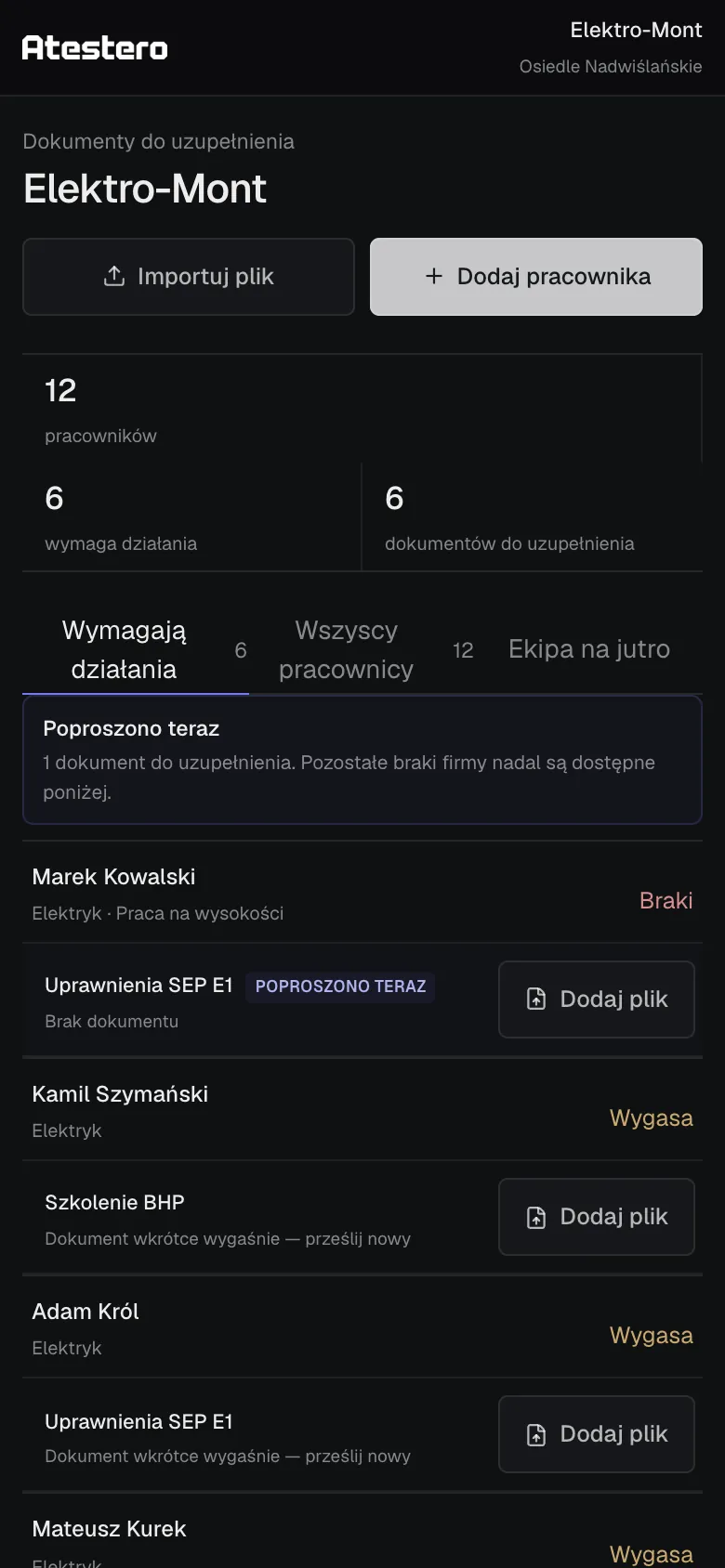
The subcontractor needs to know which worker the request concerns, which document is required, by when to react and why an uploaded file came back for correction. The portal limits the view to their own firm and that specific scope.
Subcontractor portal
Documents are sent through a link to the portal that the subcontractor gets from the general contractor. You do not need an account in the full system: after opening the link the firm sees its own workers and the list of gaps, adds a file next to the right person and requirement, then waits for the decision of the reviewer on the general contractor's side.
From 18 October 2026 new medical certificates are, as a rule, issued electronically. For a certificate, upload the PDF from the occupational medicine clinic or from the worker's Internet Patient Account (IKP), not a photo of a printout. An older paper certificate, valid until the date of the next examination, can still be sent as a photo. The rules are described in the guide on electronic medical certificates from 18 October 2026 (in Polish).
The link may ask for a one-time code sent by e-mail. After entering you see only your firm's workers and the items that need action.
Choose the missing document, add a PDF or a photo and enter the date from the document, for example the date of the next examination from the certificate.
The file goes to the reviewer. When a document comes back for correction, the portal shows the reason and you add a new version in the same case.
Every stage has an owner and leads to the next action.
The request names the worker, the requirement and the deadline for action.
The firm does not have to browse other subcontractors' data or the site manager's panel.
The file and the declared dates stay linked to the person and the requirement.
Approval, correction or rejection has a recorded reason and author.
The firm completes the document without creating another anonymous attachment.
A view limited to their own firm
A list of workers who need action
A document next to the right person
A clear reason for correction
Fewer messages needed to establish the context
Guide for firm owners
A general contractor usually asks for two sets of documents: the firm's (who you are and whether you may carry out the works) and the personal ones (whether specific people may work in that position). Requirements differ between sites (in Atestero the general contractor assigns them to the site and type of work), so the contract and the site rules are your reference point. The table below organises what comes up most often.
The validity periods of personal documents follow from regulations and from the document itself. A list of periods is in the guide validity of a construction worker's documents (in Polish), and you can work out the date for a specific training or licence in the calculator (in Polish).
| Document | Why the general contractor asks for it | Where to check the rules (in Polish) |
|---|---|---|
| Firm documents (KRS or CEIDG, NIP, third-party liability policy) | They confirm who the contractor is and that it is insured. Requirements on how current they must be are written into the contract. | Subcontractor documents for the contract and tender |
| Workers' medical certificates | They confirm fitness for work in the position. The expiry date is written in the certificate. | Validity of medical examinations |
| H&S training (initial, periodic) | It confirms the worker has done the required training. How often depends on the group of positions. | H&S training: how often |
| Licences (UDT, SEP, work at height) | They are required to operate equipment, work on electrical installations and work at height. | UDT licences, SEP licences |
| Documents of foreign and posted workers | They confirm the legality of work or social security cover (A1). | Foreign workers on site, A1 document |
| List of workers and declarations | The crew line-up reported to the general contractor and the declarations the contract requires. | Templates to download |
The scope of documents is set by the contract with the general contractor and the regulations that apply to your works.
Answers to questions that come up before work starts.
The scope of requirements and responsibilities is set by the organisation for a specific site and cooperation.
No. The portal is limited to the right firm, its workers and the items that need action. The general contractor manages each firm separately, with its workers and access (firms in Atestero).
No. The limited portal can work without access to the site manager's panel and the data of the whole site.
The file goes to the queue of the authorised person. Sending it does not mean approval or that the worker is ready.
Most often the firm's documents (KRS or CEIDG, third-party liability policy) and each worker's documents: medical certificate, H&S training certificate, licences for the work they do and, where relevant, a foreign worker's documents. The exact list is set by the contract with the general contractor, and to check the whole set before sending you can use the worker document check checklist (in Polish).
The subcontractor gets a limited portal for their own workers and does not have to create an account in the full system. The document requirements stay as agreed in the contract. What the first site with Atestero looks like is described in the pilot plan.
A subcontractor is a firm or a person that carries out part of the construction works under a contract with the general contractor or another subcontractor. For the client to be jointly liable for their pay, the detailed scope of works is reported to the client before they start (Art. 647¹ of the Civil Code). More: subcontractor: who is that (in Polish).
Download the PDF of the electronic certificate from the occupational medicine clinic or the worker's Internet Patient Account (IKP) and upload it in the portal under the “Medical certificate” requirement. A screenshot or a photo of a printout makes the review harder.
The employer, which is your firm: it refers workers for examinations (Art. 229 § 4a of the Labour Code), trains them and does not let them work without a valid certificate (Art. 229 § 4 of the Labour Code). From 8 July 2026 a breach of H&S rules carries a fine of PLN 2,000 to 60,000, as described in the guide on penalties for letting someone work without a medical examination and H&S training (in Polish).
The free conversation starts with how you check documents and the planned crew today.
If Atestero fits your process, the free pilot covers one site and an agreed scope. No real documents go into the public demo.
Tell us about your processA short form with no attachments. We reply personally, with no automatic qualification.